
Contents
Have a pile of things you want to sell on eBay, but don't feel like spending hours writing listings?
What if you could just take a few photos and let AI do the writing?
AI can help you create product titles, find relevant keywords, write descriptions, and prepare product details. And with tools built specifically for eBay, you can go from photos to a complete listing in about 15 seconds.
Here's how.
1. Take Photos of Your Item
Start with your smartphone. No professional camera needed.
Photograph your product from different angles, including labels, model numbers, and any visible imperfections.
Selling a vintage clock, Bluetooth speaker, collectible toy, or kitchen appliance? Clear photos give AI more information to work with.
The better your photos, the easier it is to identify the product accurately.
2. Let AI Create Your eBay Listing
You could use a general AI chatbot to write a product description. But you'd still need to organize the information, prepare your eBay title, choose a category, and transfer everything into your listing.
Zetlis is built specifically for eBay sellers.
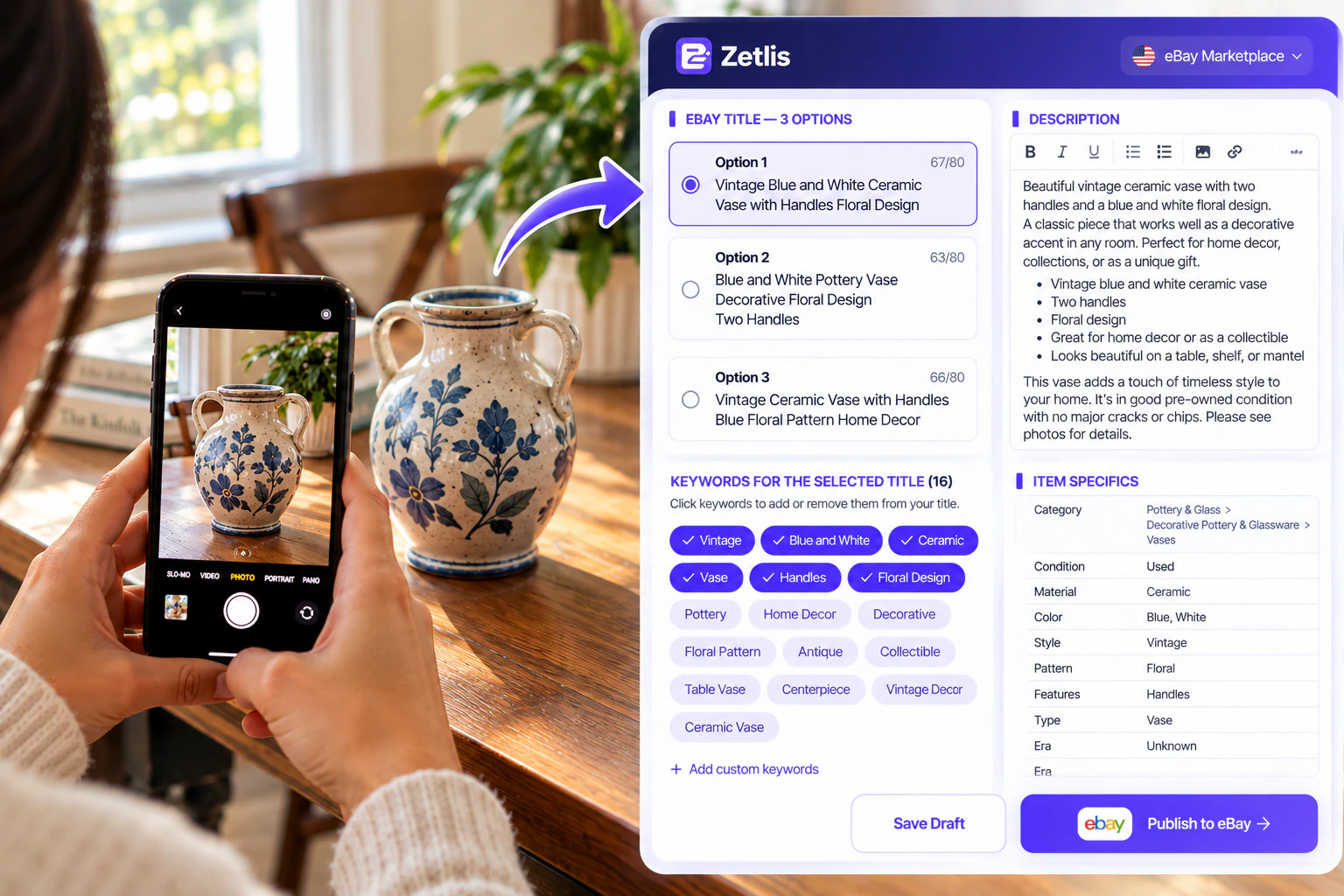
Simply add your product photos, and Zetlis uses AI to prepare:
- 3 editable eBay titles
- Dozens of suggested keywords across your title options
- A complete product description
- Suggested eBay category and item specifics
- Direct publishing to eBay in one click
Everything is prepared in one place, ready for you to review and edit.
No complicated prompts. No writing everything from scratch. No copying and pasting between different tools.
3. Choose Your Title and Keywords
Your eBay title is one of the first things potential buyers see.
Instead of trying to come up with the perfect title yourself, Zetlis gives you three options.
Each title has associated suggested keywords that you can add or remove.
For example, when listing a vintage ceramic vase, relevant keywords might include:
Vintage Decor • Ceramic Vase • Floral Design • Home Decor • Decorative Pottery
Choose the title you prefer, customize the keywords, and make it your own.
You remain in control of the final listing.
4. Review Your Listing Before Publishing
AI makes listing creation easier, but you should always verify the information.
Check the product's condition, brand, model, size, included accessories, and any defects.
AI can't reliably tell whether a used electronic device works just by looking at its photos.
You know your product. AI helps you describe it.
Once everything looks right, set your price and shipping details.
5. Publish Directly to eBay
Here's the best part.
With Zetlis, you don't need to manually transfer your listing to eBay.
Take photos → AI creates your listing → Review → Publish.
Your listing can be live on eBay in under 1 minute.
Work from your phone, computer, or both. Whether you're clearing out your garage, selling thrift-store finds, or listing items while traveling, Zetlis goes wherever you go.
Your listings are also saved in History, so you can edit and reuse them without spending another AI analysis credit.
Stop Writing Listings. Start Listing.
Why spend your time typing titles, searching for keywords, and writing descriptions when AI can prepare everything for you?
3 editable titles. Dozens of keywords. Complete descriptions. One-click eBay publishing.
Start with 10 FREE AI analyses. No credit card required. Connect your eBay account only when you're ready to publish directly.
Create & Publish Your First 10 eBay Listings FREE with Zetlis!
No credit card required. Just take photos, review your listings, and publish to eBay.
Start Listing Free →